
WordPress & WooCommerce Integration Guide
The cmercury WordPress Plugin brings enterprise-grade email marketing, customer syncing, and high-deliverability transactional emailing directly into your WordPress and WooCommerce ecosystem. Whether you manage a blog, corporate site, or a full-scale e-commerce store, this integration ensures that form submissions, customer data, and system emails flow seamlessly into your cmercury account, without any manual exports or imports.
Designed to be lightweight, secure, and fully automated, the plugin gives you a simple, scalable way to collect subscribers, sync WooCommerce customers, improve email deliverability, and automate workflows. With just a few clicks and absolutely no coding, your website connects effortlessly to cmercury, allowing you to grow your audience and personalize communication with ease.
What This Integration Enables
1. Collect Subscribers Effortlessly
Capture leads from popular WordPress form plugins and send them directly into your cmercury lists.
Key Capabilities
- Automatic email-field detection
- Supports Contact Form 7, WPForms, and Gravity Forms
- Built-in universal shortcode: [cmercury_form]
- Custom field mapping for advanced forms
- Tags and attributes auto-synced for segmentation
Whether you’re running landing pages, newsletter popups, or inquiry forms, subscriber data flows into cmercury instantly, no manual uploads needed.
2. Sync WooCommerce Customers (New!)
Turn your WooCommerce store into a powerful data source for segmentation and automated journeys.
Customer attributes synced include:
- Name & Email
- Billing Country, State and City
- Total Orders
- Total Spend
- First / Last Seen Dates
- Average Order Value
- Store URL and Store Name
- Guest & Registered Customers
What you can automate with this sync:
- Winback sequences
- High-value customer campaigns
- Repeat purchase nudges
- Product recommendation workflows
- Customer lifecycle journeys
The sync runs in the background continuously, ensuring your cmercury audience is always up to date. Click here to see effective segmentation examples and real-world use cases that show how to turn this synced WooCommerce data into highly targeted email campaigns.
3. Improve Email Deliverability (Transactional Mailer)
WordPress and WooCommerce often face deliverability problems due to server limitations.
This plugin solves that by routing all system-generated emails through cmercury’s transactional mail engine, no SMTP plugins required.
Supported email types:
- Order confirmations
- Password resets
- New user registrations
- Contact form notifications
- Administrator alerts
- WordPress system notifications
- Newsletter emails via WordPress
What you need to enable it:
- Verified Sending Domain
- Sender Name & Email
- Transactional Trigger ID
Result:
Better inbox placement, faster send speeds, centralized credit management, and dramatically fewer spam issues.
4. Security & Reliability Built-In
Your integration remains secure, stable, and fully compliant with WordPress standards.
Security features include:
- API token validation
- Safe credential storage
- Background syncing with clear status messages
- Optional logging for debugging
- Error handling with visibility for developers
This ensures safe, seamless communication between your WordPress site and cmercury.
This Integration Is Ideal For:
- Newsletter subscription forms
- WooCommerce stores
- Landing page signups
- Blogs capturing leads
- Custom form workflows
- WordPress-driven businesses & agencies
Installation & Setup Guide
1. Download Plugin
Download the latest version of the cmercury WordPress Plugin:
2. Install the Plugin
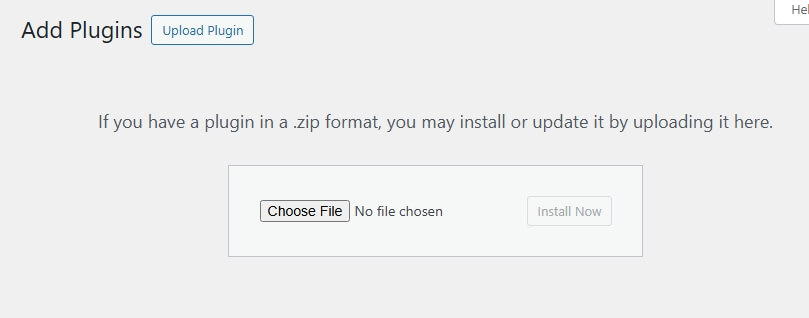
- Go to WordPress Admin → Plugins → Add New
- Click Upload Plugin
- Upload the downloaded .zip file
- Click Install Now → Activate
Authentication Setup
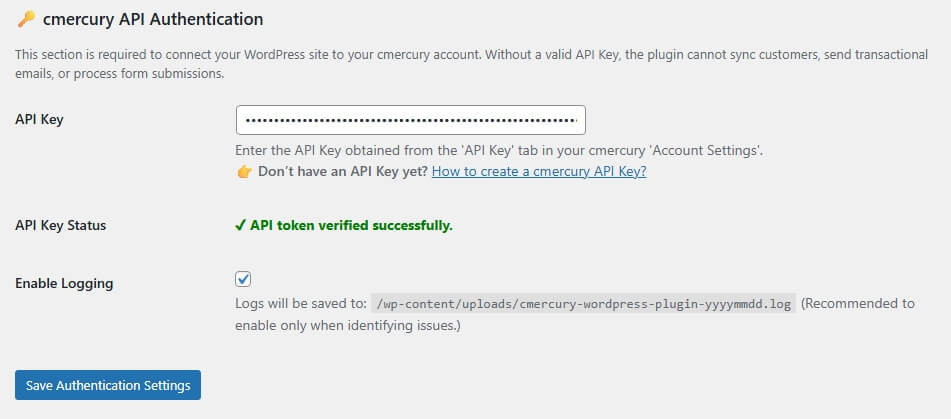
Navigate to: WP Admin → cmercury → Authentication
API Key
Accept the Data Protection Responsibility > Enter your API Key from: cmercury → Account Settings → API Key > Save Authentication Settings.
Need help?
👉 Learn how to create an API Key (https://help.cmercury.com/docs/api-key-management/)
API Key Status
The plugin validates your API Key automatically:
- ✔ Valid – Connection successful
- ✘ Invalid – Please recheck your key
Enable Logging (Optional)
Logging helps troubleshoot plugin issues. When enabled, logs are stored at:
/wp-content/uploads/cmercury-wordpress-plugin-YYYYMMDD.log
Forms Integration
Go to the Forms Integration tab.
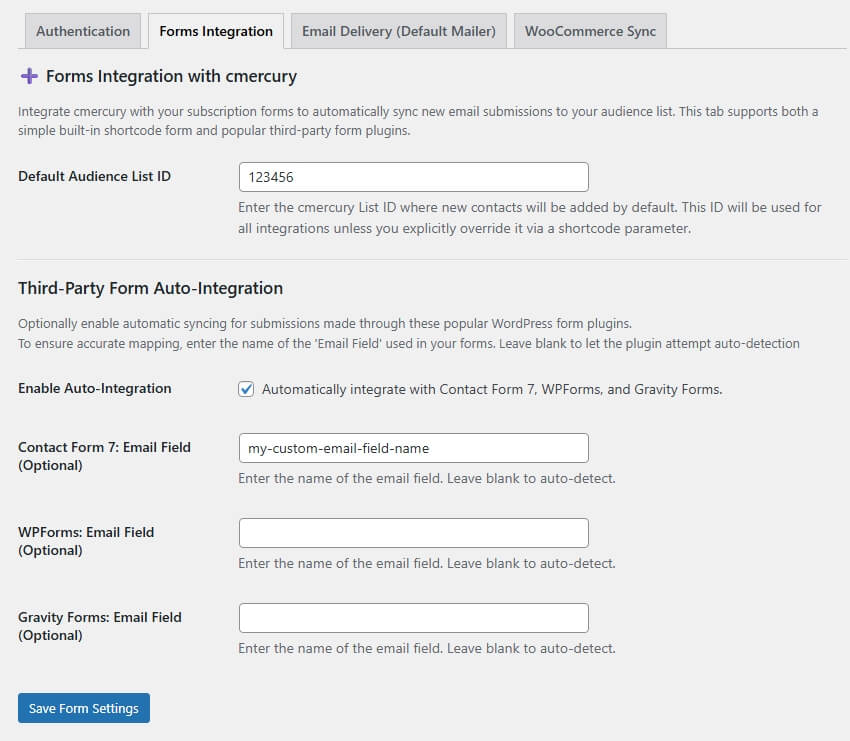
Default Audience List ID : Enter the List ID where all new contacts from WordPress forms should be saved.

Supported Form Plugins
- Contact Form 7
- WPForms
- Gravity Forms
You may specify each plugin’s Email Field Name for accurate mapping (leave empty to auto-detect).

Shortcode Subscription Form
Use the built-in shortcode anywhere on your site:
Basic Form:
[cmercury_form]Form with Custom List:
[cmercury_form list_id="your-list-id"]Form with Custom Button Text:
[cmercury_form button="Join Our Newsletter"]Form with Custom List + Custom Button:
[cmercury_form list_id="your-list-id" button="Join Our Newsletter"]Email Delivery (Default Mailer)
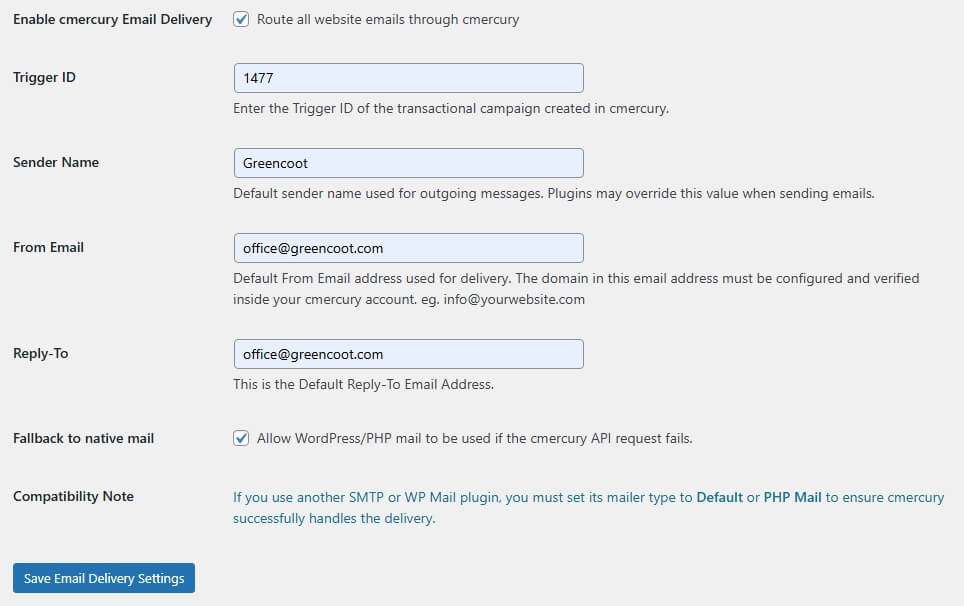
Go to the Email Delivery tab.
This feature routes all outgoing WordPress + WooCommerce emails through cmercury’s high-deliverability Transactional Email Engine.
Before You Enable This
Create a Transactional Campaign inside cmercury:
- Go to Campaigns → Create Campaign → Automations → Transactional
- Copy the Trigger ID
- Enter it in your plugin settings
Required Fields
- Trigger ID
- Sender Name
- From Email (must be domain-verified in cmercury)
- Reply-To
Important
If you use any SMTP plugin, ensure the sending method is set to: PHP Mail / Default
You may optionally enable fallback to native PHP mail.
WooCommerce Customer Sync
Navigate to the WooCommerce Sync tab. It pulls in all WooCommerce customers, including guest checkouts, and syncs their complete purchase attributes to cmercury.
Destination List ID
Enter your List ID. If left blank, the plugin auto-creates a list named: Store_Customers
Customer Data Synchronisation
The following attributes are added to your cmercury list:
- First Name, Last Name
- Country, City, State
- FirstSeenDate, LastSeenDate
- TotalOrders, TotalSpend
- AverageOrderValue
- StoreURL, StoreName
- CustomerRoles, StoreUserId
- CartEmptyStatus, CartTopItemValue, TopValuedItemInCart
- TopCategoryInCart, CartItemsCount, CartLastUpdate, CartTotalValue
- LastProductId, LastProductName, LastCategoryName,LastCategoryID
- TotalProductsPurchased, LastOrderTotal, LastPurchaseDate
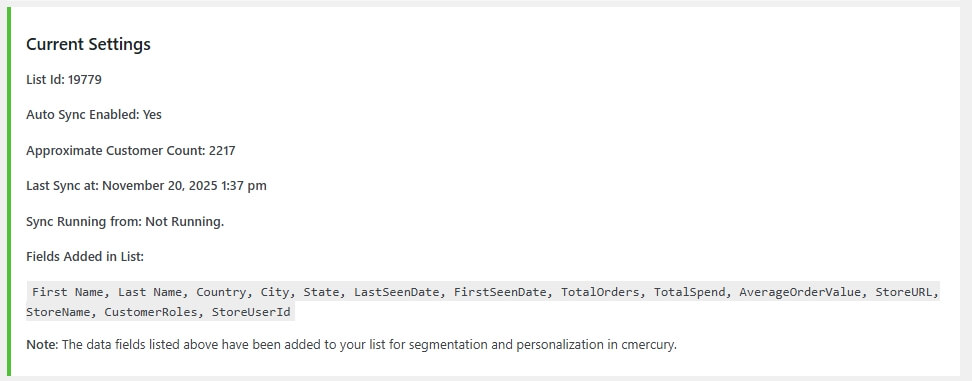
Current Synchronization Details (Displayed after saving settings)
- Connected List Id
- Approximate Customer Count
- Auto Sync Enabled
- Last Sync at
- Sync Running from
One-Time Full Sync
Click Sync Now to run a complete customer sync from WooCommerce to cmercury.
Export Customers (CSV)
Overview
The Export Customers (CSV) feature allows WooCommerce store administrators to export customer data as a CSV file for manual import into cmercury. This option is useful for initial migrations, audits, or controlled data uploads.
Output
- File format: .csv
- Contains customer and related commerce data mapped to cmercury-supported fields
- Compatible with cmercury’s manual import and validation workflows
Data Synchronization & Segmentation Capabilities
Overview
Beyond basic customer syncing, the cmercury WooCommerce integration supports the synchronization of 25+ behavioral and transactional data attributes from your store into the cmercury platform.
Advanced Segmentation
Purpose
This enriched data layer enables advanced, behavior-driven segmentation, allowing marketers to move beyond generic newsletters to highly targeted, performance-focused campaigns.
Use Cases
- High-value customers based on lifetime spend
- Repeat buyers of specific products or categories
- Customers with active carts but no recent purchases
- Win-back campaigns based on inactivity windows
- Product-specific upsell and cross-sell journeys
Why Segment with cmercury?
Key Benefits
- Automatic attribute mapping from WooCommerce to cmercury
- No manual data transformation required
- Campaigns triggered by real shopping behavior, not static lists
- Higher relevance, improved conversions, and stronger customer retention
By leveraging synchronized WooCommerce data within cmercury, businesses can build precise audiences, ensure context-aware communication, and execute high-impact email campaigns with confidence.
| Focus Area | Synced Data Attributes (Examples) | Resulting Segmentation Logic & Outcome |
|---|---|---|
| Monetary Value | TotalSpend, AverageOrderValue, LastOrderTotal, OrderCount | Identify high-frequency, low-AOV customers and create an Under-performing Customer segment for targeted upsell and bundle campaigns. |
| Product Affinity | LastProductID, LastProductName, LastCategoryName, TotalProductsPurchased | Build product-interest segments (e.g., T-Shirt Buyers) and dynamically exclude customers from related promotions (e.g., jackets) if a recent purchase is detected. |
| Reactivation | LastPurchaseDate, LastSeenDate, DaysSinceLastOrder | Create a Lapsed Customer segment (e.g., no purchase in >90 days) and trigger automated win-back journeys with time-sensitive incentives. |
| Cart Recovery | CartTotalValue, CartItemsCount, IsCartEmpty, LastCartUpdate | Target High-Value Cart Abandoners (e.g., cart value > $100) with immediate, personalized recovery emails or follow-ups. |
Why This Matters
Each segmentation model is powered by real-time transactional and behavioral data, ensuring campaigns are:
- Context-aware
- Timely
- Revenue-focused
This allows marketers to replace broad, list-based emailing with precision-driven customer journeys built directly from WooCommerce activity.
Ready to Build High-Converting Audiences?
cmercury makes it simple to combine WooCommerce transactional and behavioral data with email engagement signals such as opens, clicks, and inactivity, to build high-precision audience segments and trigger fully automated, performance-driven campaigns.
By unifying commerce data and engagement history, teams can move beyond static lists and execute context-aware messaging across the customer lifecycle.
For a comprehensive guide, including step-by-step implementation instructions, field-level mapping, and a library of proven, high-impact segmentation recipes. Visit our dedicated documentation.
Auto-Update Notifications
The plugin notifies you when a new version is available for update.
Summary of Supported Features
| Feature | Supported |
| Auto-add Contacts | ✅ |
| Contact Form 7 Integration | ✅ |
| WPForms Integration | ✅ |
| Gravity Forms Integration | ✅ |
| Shortcode-Based Subscription Forms | ✅ |
| WooCommerce Customer Sync | ✅ |
| Transactional Email Routing | ✅ |
| API Token Verification | ✅ |
| Activity Logging (Optional) | ✅ |
You’re All Set. Start Automating and Growing
Your integration is now ready to power smarter, faster, and more efficient email marketing. With your API Token and List ID connected and your preferred modules enabled, your WordPress or WooCommerce site will begin syncing data with cmercury automatically.
From here, you can start leveraging the full capabilities of the integration:
- Capture leads from any supported form plugin in real time
- Sync WooCommerce customers and purchase attributes automatically
- Send personalized automations based on events and store actions
- Improve deliverability by routing all system emails through cmercury
- Maintain clean, segmented, engagement-ready lists without manual effort
- Scale your marketing workflows with zero coding or maintenance
This setup ensures your email marketing engine is always up-to-date, intelligent, and ready to engage your audience.
If you need assistance at any point, we’re here to help: 📧 support@cmercury.com
Grow confidently, cmercury handles the heavy lifting while you focus on your business.


